
Deployment of a D2S Gateway ServerEnterprise Edition > SMTP Gateway Server > Deployment This technical document describes the basic types of deployment architecture appropriate for integrating a Death2Spam server into an enterprise email system. Basic ConfigurationIn the most simple configuration, Death2Spam is installed between the firewall and the final Mail Transfer Agent (MTA), e.g. Sendmail. The Primary MX record for this configuration points through the firewall to the D2S server, and the D2S server is configured to pass mail on to the final MTA (configured via the 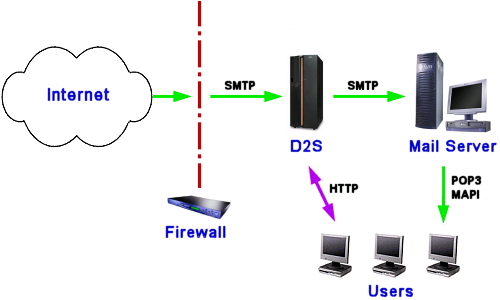
DMZ ConfigurationThere are numerous ways to configure Death2Spam for use with a Demilitarized Zone (DMZ). A DMZ configuration involves multiple firewalls, adding layers of extra security between the Internet and a company's business logic and data storage. In the simplest configuration, mail servers in the DMZ collect inbound mail, limiting it to only valid mail for the company's domain -- attempts to relay to other domains are blocked at this point. The mail servers in the DMZ are hardened such that they only listen for mail connections. Mail received in this way is forwarded from the DMZ servers to the D2S server for processing. Both the primary and secondary SMTP servers can reside in the DMZ, and may be configured to retain mail in the event that the D2S server becomes unreachable. Single Machine ConfigurationWhilst single-machine is the least expensive configuration, it is not as straightforward to setup. This configuration is ideal for small installations, where the mail server sits astride the firewall, but it is not necessary for the machine to be on the firewall itself (which can be a security hazard). In order for this configuration to work, the machine in question must have 2 IP addresses, and preferably 2 host names. 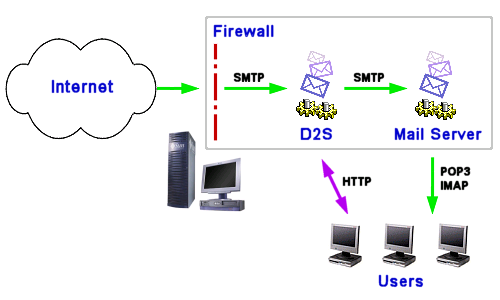
One of the IP addresses is allocated for external communications, and the D2S system is configured to use this IP address. The external MX record for the domain is configured to direct mail at this host. The second IP address is allocated to your mail application. Your mail server should be configured to listen only on this address (most mail applications will by default attempt to listen on all addresses). All internal clients should be configured to send mail via this application. In addition, the D2S server is configured to forward mail direct to the mail application via the second IP address. It is not necessary for the firewall to reside on the same machine, and usual practice will be to place the firewall on its own machine. However, Death2Spam will work just as well in this configuration as with a separate firewall. In any case, the firewall should not prevent external access to the mail application -- it should be configured to forward all external mail to the D2S server for filtering. Other ConfigurationsFor advanced configurations, there is an almost limitless number of ways of configuring the Death2Spam server. Here are some examples and tips: Single Machine using Firewall NATAn advanced firewall with Network Address Translation can be used to create a single machine configuration utilizing only one IP address:
Running D2S as a Non-Privileged User (Unix)You can configure D2S to run as a non-privileged user by configuring it to listen on non-privileged ports (using Configuring External Secondary Mail Servers to use D2SIf you have more than one MX record, but only one primary mail server, you can configure the secondary mail servers to use Death2Spam. This configuration assumes the secondary servers are operating in a store-and-forward capacity, collecting mail while the primary mail server is off-line, and then forwarding it to the primary server when it comes online again. For this configuration:
| |
| |